Lab 03 - Assembly Language
From: https://ocw.cs.pub.ro/courses/cns/labs/lab-02
Resources
- x86 Assembly Guide
- X86 Opcode and Instruction Reference
- Intel 64 and IA-32 Architectures Software Developer Manuals
- x86 opcode & instruction structure cheatsheet
- NASM Documentation
- Linux syscall ABI
- X86 ASM Arithmetic
If you are just beginning using assembly, you can follow this tutorial.
Supporting files
Software
- nasm
- gcc with libraries for compiling 32-bit
Tutorials
This lab aims to guide you through the basics of x86-64 assembly, from architectural specifics and instruction encoding to programming, disassembly and code generation from C snippets. For the sake of simplicity, we will focus on the 64-bit x86 Instruction Set Architecture (ISA).
Note that we will use the Intel/NASM syntax (as opposed to the AT&T syntax used by default in objdump and the GNU assembler) throughout the course and labs. See the NASM documentation for more information.
You can make objdump emit Intel assembly by using the -M intel option.
x86 processors implement the following types of instructions:
- Data transfer:
mov,xchg,lea,movsb, etc. - Control flow:
jmp,call,ret,loop - Arithmetic/Logic:
add,sub,mul,div,and,or, etc.
The following addressing modes are available (note that NASM uses semicolons for comments):
mov eax, [0xcafebab3]         ; direct (displacement)
mov eax, [esi]                ; register indirect (base)
mov eax, [ebp-8]              ; based (base + displacement)
mov eax, [ebx*4 + 0xdeadbeef] ; indexed (index*scale + displacement)
mov eax, [edx + ebx + 12]     ; based-indexed w/o scale (base + index + displacement)
mov eax, [edx + ebx*4 + 42]   ; based-indexed w/ scale (base + index*scale + displacement)
The rest of the introduction gives some examples and guidelines to aid in x86 assembly programming in Linux.
A Hello World program
Consider the following simple C program:
#include <stdio.h>

int main() {
  puts("Hello world!");
  return 0;
}
You can compile this with gcc -O0 hello.c -o hello. Let's take a sneak peek at the assembly generated by the GCC compiler for this basic program: objdump -M intel -d hello. Notice that the generated binary contains a lot of extra stuff in addition to our main function. We will try to code in assembly language a program with the same functionality. For now, we need to obtain an executable that contains the following information:
- some data (the
“Hello world!”string) - actual executable code
- metadata (e.g. in the ELF header) to help us reach the
putslibrary function; note that we can either statically linkputsin our executable, or dynamically link with thelibc.sobinary available in the system.
The following assembly source should cover the above. Copy it in a file called hello.asm
global    main
extern    puts

section   .text
main:
  mov       rdi, message
  call      puts
  ret
message:
  db        "Hola, mundo", 0
To assemble this run: nasm -felf64 hello.asm. This will produce object file hello.o. Of what type is the file hello.o?
We can disassemble the instructions in hello.o with objdump:
$ objdump -M intel -d hello.o

hello.o:     file format elf64-x86-64


Disassembly of section .text:

0000000000000000 <main>:
   0:   48 bf 00 00 00 00 00    movabs rdi,0x0
   7:   00 00 00
   a:   e8 00 00 00 00          call   f <main+0xf>
   f:   c3                      ret
As we can see, there is no reference to the puts function but it is present in the relocation records that will be used by the linker. Lets use the -r option with objdump to look at those...
$ objdump -M intel -r hello.o

hello.o:     file format elf64-x86-64

RELOCATION RECORDS FOR [.text]:
OFFSET           TYPE              VALUE
0000000000000002 R_X86_64_64       .text+0x0000000000000010
000000000000000b R_X86_64_PC32     puts-0x0000000000000004
To dynamically link our object file with libc we can use ld.
$ ld -lc -m elf_x86_64 -dynamic-linker /lib64/ld-linux-x86-64.so.2 -e main hello.o -o hello_min
Figure out what all those options do. The most important are: **-lc** and **-e main**.
- What happens when you don't use the
-lcoption? - What happens when you don't use the
-eoption? - What happens when you don't use the
-o hello_minoption?
When linked correctly the linker will generate the hello_min executable. Use the file command to observe the difference in the file types of hello.o and hello_min
You may notice that the program gives a segmentation fault message upon exit. This happens because we don't call exit at the end of main. This should normally be handled by __libc_start_main, which is part of the Linux Standard Base Core Specification.
An alternate way of building the executable from the existing hello.o file is by asking gcc to do it (after all,gcc knows how to invoke the compiler, the assembler and the linker)
gcc hello.o -o hello_min -no-pie
The disassembly of the final binary also contains some code that will find puts at runtime. We will learn more about the .plt section in the following sessions.
$ objdump -M intel -d hello_min

0000000000401000 <.plt>:
  401000:   push   QWORD PTR [rip+0x2002]
  401006:   jmp    QWORD PTR [rip+0x2004]
  40100c:   nop    DWORD PTR [rax+0x0]

0000000000401010 <puts@plt>:
  401010:   jmp    QWORD PTR [rip+0x2002]
  401016:   push   0x0
  40101b:   jmp    401000 <.plt>

Disassembly of section .text:

0000000000401020 <main>:
  401020:   movabs rdi,0x401030
  40102a:   call   401010 <puts@plt>
  40102f: ret
Function calls
C compilers translate function calls into assembly using a standard calling convention. Calling conventions determine how function parameters are passed (e.g. via registers or the stack) and which of the registers must be saved by the caller or the callee. On x86-64, rsp and rbp are typically involved in holding information about the current stack frame, for the stack pointer and base pointer respectively.
You can think of each stack frame like a contextual area on the stack which is specific for each function call. The function manages its arguments and parameters in this given area on the stack.
Here's an example of a stack frame holding local variables and parameters:
[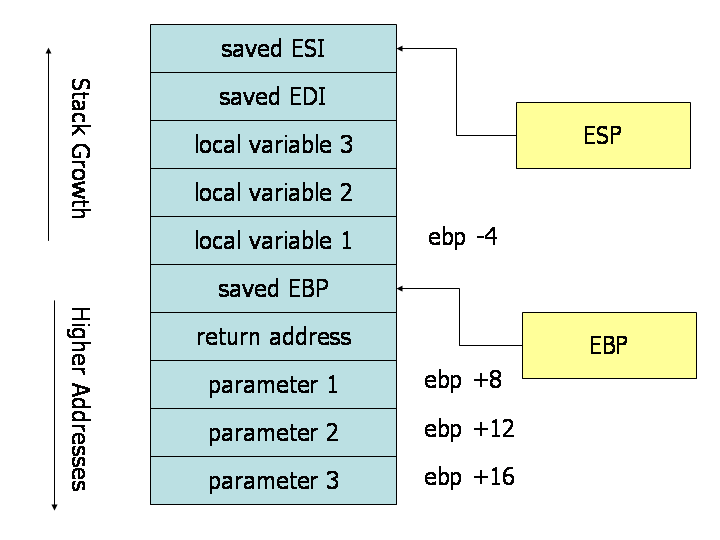
(Source: x86 Assembly Guide)
Note that on many architectures (including x86), the stack “grows down”, i.e. opposite to the addresses' growth.
Linux system call convention
Calls to the operating system are similar to function calls in the sense that they require passing a set of parameters according to a given convention and altering the control flow of the program. However, unlike function calls, which for example on x86 are issued using the call instruction, system calls are issued using a software interrupt instruction, e.g. **int 0x80** on x86 and syscall on the x86-64. Note that the system call convention is not only architecture-specific, but also OS-specific.
Linux adopts the following convention on *x86-64:
raxcontains the syscall ID- parameters are passed in
rdi,rsi,rdx,r10,r8,r9(in this order) - return values are placed in
rax(where available) - the syscall is responsible for saving and restoring all registers
Syscalls are not usually invoked directly, but through wrappers in libc. You can read about how this is implemented in this LWN article.
Other useful references:
- Linux syscall table with ID, source code, and parameters.
- Operation Systems lecture (Romanian) discussing syscalls theory and Linux implementation.
- Implementing Linux syscalls
- https://syscalls.kernelgrok.com/
Compiler patterns
We encourage you to run common code patterns, such as for and while loops, switch statements as well as others in the Compiler Explorer available at http://gcc.godbolt.org/. Check this example out.
Tasks
1. Simple system call [3p]
execve is a linux system calls that accepts as parameter a program and executes it. We will use assembly language to create a program that behaves like the execve program.
You can check this C source code for a better understanding how the execve call behaves.
Use assembly to write a program that receives N command line parameters, and dispatches them to the execve syscall. If the 1st parameter starts with . (such as ./ping 8.8.8.8) the program should NOT call execve and instead print an error message. You can use libc's printf or puts for the error message, but you should call execve directly using syscall. You can assume the command line parameters are already on the stack, and you can generate the boilerplate code that takes care of this by linking with gcc as opposed to ld:
$ nasm -f elf64 execve.asm
$ gcc -lc  execve.o -o execve
Skeleton code:
extern puts

global main

section .data
  callDenied: db 'call denied!',0x0a,0
section .text
main:
  push rbp
  mov rbp, rsp

  ; write your code here -------------------------------
  ; TODO
  ; ----------------------------------------------------

  leave
  ret
Examples:
$ ./execve ./ping 8.8.8.8 => FAILS
$ ./execve /bin/ping 8.8.8.8 => WORKS
As a warm-up, let's take a look at how we can structure our assembly program. It needs to do the following:
- (Optionally) check that
argcis greater than one. We'll do this to make sure thatargvis properly accessed at run-time. - Check that
argv[1]doesn't start with a period, i.e. thatargv[1][0] != '.'. We know that.ASCII is0x2e. - Call
execve(system call number 11) directly as a system call (read above for the system call convention). - Return, if there's an error.
We'll mark all these actions as assembly labels, making our program look like this:
extern puts

global main

section .data
  callDenied: db 'call denied!',0x0a,0
section .text
main:
  push rbp
  mov rbp, rsp

check_argc:

check_argv1:

do_execve:

; Should never get here
done:

  leave
  ret
Implementing check_argc should be pretty straightforward. Build the executable and execute it using gdb. Breakpoint at main and observe the stack. As you see, the argc is being received via the rdi, so we can just compare it with 1. x86-64 assembly gives us the jg (jump if greater) instruction to do conditional jumps after a cmp. In case everything's ok, we can jump to check_argv1, otherwise we'll jump to done:
check_argc:
  cmp rdi, 1
  jg check_argv1 ; we're ok
  jmp done
To make things more verbose, let's also display a message in case the condition is not respected. We'll need to call puts, so we'll have to reference it in the header of our code:
extern puts
global main
We also have to add a string comprising the error message:
section .data
  callDenied: db 'call denied!',0x0a,0
  nothingToCall: db 'nothing to call!',0x0a,0
Now we can modify check_argc
check_argc:
  cmp rdi, 1
  jg check_argv1 ; we're ok
  mov rdi, nothingToCall
  call puts
  jmp done
There are, of course, other (possibly more efficient) ways to organize your program and do sanity checks. Give it some thought!
check_argv1 is implemented similarly. Remember:
argvis received throughrsi
Also remember from the Linux system call convention how to implement do_execve:
raxshould contain the system call number (11)rdishould contain a pointer to the executable's path, i.e.argv[1]rsishould contain a pointer to the arguments (equivalent to&argv[1]); useleato compute this addressrdxshould contain a pointer toenvp(you can set it to zero)- The call should be triggered by a
syscallinstruction
In order to test that the system call was done, you can run the program with strace:
$ strace ./execve /bin/ls

execve("./execve", ["./execve", "/bin/ls"], [/* 48 vars */]) = 0
[ Process PID=... runs in 32 bit mode. ]
...
execve("/bin/ls", ["/bin/ls"], [/* 0 vars */]) = 0
...
2. Looping math [3p]
You can find a tutorial on doing assembly-based multiplication and division here.
Use assembly to write a program that iterates through a statically allocated string (use the .data section), and calls a function that replaces each letter based on the following formula:
NEW_LETTER = 33 + ((OLD_LETTER * 42 / 3 + 13) % 94)
Print the new string at the end.
Some tips:
- Reuse the basic structure in the previous task. You only need to import
puts, declare.datawith a string and.textwithmain, as well as your implementation. - Create a mapping between the variables you'd have in your C program and actual CPU registers. If you think you don't have enough available CPU registers, don't be afraid to allocate space on the stack (but don't do it if it's not necessary!).
- Compilers are smart and they produce fairly readable code with
-O0, so copy the patterns there.
For the string this is a test, you should get H\j:vj:vXvH2:H
3. Funny convention [4p]
The funny binary is already dynamically linked with a missing library (libfunny.so), that you'll have to recreate in assembly. The library contains a wrapper for the write syscall called leet_write. The original library was using a funny calling convention, slightly different from the standard one. Figure out the convention, write the wrapper in NASM, and compile the library. Test by running the provided binary.
- First, lets examine some of the information provided by
readelf
readelf -a funny
Notice the entry point address and write it down. Also notice the rel.dyn and rel.plt sections, which list some of the external symbols that the dynamic linker must resolve in order for this program to run. You will see:
count_param, which is a global variable that you will have to define in the library.puts@GLIBC_2.0, which is a function that the dynamic linker will be able to find in the glibc library.
The library is position independent, and exposes 2 symbols: the function, and some global variable. The skeleton is provided in libfunny.asm:
extern _GLOBAL_OFFSET_TABLE_
extern puts

; export a library function and a global var
global count_param:data 4
global leet_write:function

section .data
  leet: db "executing leet_write()", 0
  count_param: dd 0

section .text
leet_write:
  ; debugging purpose
  push leet
  call puts

  ; write your code here --------------------------------------------
  ; TODO
  ; -----------------------------------------------------------------

  add esp, 4 ; leet from above
  ret
To assemble and create the .so file run:
$ nasm -f elf32 libfunny.asm
$ ld -shared -lc -m elf_i386 libfunny.o -o libfunny.so
You should be able to run the provided binary as long as the correct library is in ./.
Hint: The count_param symbol is in the caller's address space, even if it is exported by the library. You'll have to use count_param wrt ..sym to reference it in the library. See Section 9.2.4 in the NASM documentation.
4. Extra: Obfuscation [1p]
Write a program that does a completely different thing than what objdump will show by jumping into the middle of an instruction. After the jump, the processor will “see” another stream of valid instructions.
Hint: Overlapping instructions
You can probably use a small program like this to test your shellcode:
static char sc[] = "\xde\xad\xbe\xef";

int main() {
  void (*code)() = (void *)sc;
  code();
  return 0;
}
NASM can also assemble in binary format (not ELF). You will also need to mark .data as executable.