<?xml version="1.0" encoding="utf-8"?>
<feed xmlns="http://www.w3.org/2005/Atom">

  <title><![CDATA[Humberto Ortiz-Zuazaga]]></title>
  <link href="http://ccom.uprrp.edu/~humberto//atom.xml" rel="self"/>
  <link href="http://ccom.uprrp.edu/~humberto//"/>
  <updated>2014-12-23T11:36:00-04:00</updated>
  <id>http://ccom.uprrp.edu/~humberto//</id>
  <author>
    <name><![CDATA[Humberto Ortiz-Zuazaga]]></name>
    
  </author>
  <generator uri="http://octopress.org/">Octopress</generator>

  
  <entry>
    <title type="html"><![CDATA[Skating around the Condado Lagoon]]></title>
    <link href="http://ccom.uprrp.edu/~humberto//blog/2014/12/23/skating-around-the-condado-lagoon/"/>
    <updated>2014-12-23T11:28:49-04:00</updated>
    <id>http://ccom.uprrp.edu/~humberto//blog/2014/12/23/skating-around-the-condado-lagoon</id>
    <content type="html"><![CDATA[<p>
I had a <a href="http://www.mapmyrun.com/workout/823736965">good skate session</a> today. I took a lap around the Condado
Lagoon. I&#8217;ts about 4.4 miles, and took me some 38 minutes. It was
partly cloudy and windy, but only sprinkled on the course. The
pavement wasn&#8217;t too bad, and it was mostly dry. The bike path parallel
to Baldorioty Ave. is really nice.
</p>

<p>
It&#8217;s been too long since I skated any distance. It&#8217;s good to get some
exercise again.
</p>
]]></content>
  </entry>
  
  <entry>
    <title type="html"><![CDATA[Workshop: Microarray Analysis with Bioconductor]]></title>
    <link href="http://ccom.uprrp.edu/~humberto//blog/2014/11/14/workshop-microarray-analysis-with-bioconductor/"/>
    <updated>2014-11-14T19:19:17-04:00</updated>
    <id>http://ccom.uprrp.edu/~humberto//blog/2014/11/14/workshop-microarray-analysis-with-bioconductor</id>
    <content type="html"><![CDATA[<p>
I gave a workshop today on microarray analysis with <a href="http://bioconductor.org">Bioconductor</a>. The
<a href="http://ccom.uprrp.edu/~humberto/teaching/microarray-workshop/expression-slides.html">slides</a> and a <a href="http://ccom.uprrp.edu/~humberto/teaching/microarray-workshop/expression-handout.pdf">handout</a> are online, and I have a <a href="https://github.com/humberto-ortiz/expression-workshop">github repository</a> with the code for
the slides, a handout, and the example scripts.
</p>
]]></content>
  </entry>
  
  <entry>
    <title type="html"><![CDATA[Courses for Spring 2015]]></title>
    <link href="http://ccom.uprrp.edu/~humberto//blog/2014/11/14/courses-for-spring-2015/"/>
    <updated>2014-11-14T18:53:47-04:00</updated>
    <id>http://ccom.uprrp.edu/~humberto//blog/2014/11/14/courses-for-spring-2015</id>
    <content type="html"><![CDATA[<p>
I posted draft syllabi for next semester&#8217;s courses today. I&#8217;ll be
teaching <a href="../../../../..//teaching/compilers.html">CCOM 4089 Compiler Design</a> and 
<a href="../../../../../teaching/seminar2.html">CCO3982 Undergraduate Seminar 2</a>.
</p>

<p>
Compilers is going to be fun. I&#8217;m going to try and teach it using a
functional language, <a href="http://sml-family.org">Standard ML</a>.
</p>
]]></content>
  </entry>
  
  <entry>
    <title type="html"><![CDATA[All the streets]]></title>
    <link href="http://ccom.uprrp.edu/~humberto//blog/2014/08/05/all-the-streets/"/>
    <updated>2014-08-05T14:22:59-04:00</updated>
    <id>http://ccom.uprrp.edu/~humberto//blog/2014/08/05/all-the-streets</id>
    <content type="html"><![CDATA[<p>
Got in a good run this morning, hitting <a href="http://www.mapmyrun.com/workout/676940387">all the streets</a> in my
neighborhood. I ran early, but it was already 99% relative humidity
and 80 degrees.
</p>
]]></content>
  </entry>
  
  <entry>
    <title type="html"><![CDATA[Around El Se&ntilde;orial]]></title>
    <link href="http://ccom.uprrp.edu/~humberto//blog/2014/08/03/around-el-senorial/"/>
    <updated>2014-08-03T10:15:23-04:00</updated>
    <id>http://ccom.uprrp.edu/~humberto//blog/2014/08/03/around-el-senorial</id>
    <content type="html"><![CDATA[<p>
I got in a <a href="http://www.mapmyrun.com/workout/673939291">slightly longer run</a> this morning. It was 2.75 miles in 34
minutes. I&#8217;m glad I got in more than 30 minutes, but I&#8217;d have liked to
cover more distance. The course is pretty tough, the change in
elevation is 159 feet.
</p>

<p>
I hadn&#8217;t run in a few days, what with orientations and Tropical Storm
Bertha. The weather is nice today though, sunny and breezy.
</p>
]]></content>
  </entry>
  
  <entry>
    <title type="html"><![CDATA[Using PR-NETS to move next-generation sequencing data]]></title>
    <link href="http://ccom.uprrp.edu/~humberto//blog/2014/08/02/pr-nets/"/>
    <updated>2014-08-02T20:20:30-04:00</updated>
    <id>http://ccom.uprrp.edu/~humberto//blog/2014/08/02/pr-nets</id>
    <content type="html"><![CDATA[<p>
We recently implemented most of the tools for <a href="http://ccom.uprrp.edu/~prnets/">PR-NETS</a>, a high-speed
network based on the architecture in <a href="http://www.uprrp.edu/">UPR-RP</a>. We&#8217;ve
been having some trouble moving large files like sequencing data
off-campus, so I decided to test if PR-NETS has made a difference.
</p>

<p>
TL;DR: PR-NETS is awesome. Read the <a href="../../../../../research/cc-nie/case-studies/sequence/index.html">case study</a> for more information.
</p>
]]></content>
  </entry>
  
  <entry>
    <title type="html"><![CDATA[Flat course]]></title>
    <link href="http://ccom.uprrp.edu/~humberto//blog/2014/07/28/flat-course/"/>
    <updated>2014-07-28T11:10:29-04:00</updated>
    <id>http://ccom.uprrp.edu/~humberto//blog/2014/07/28/flat-course</id>
    <content type="html"><![CDATA[<p>
I&#8217;m making good use of the last few days of my vacation by getting
some exercise in. I got up a little late today, but went out this
morning for <a href="http://www.mapmyrun.com/workout/665397443">a short run</a>. I tried to stay on mostly flat roads, and
keep my pace up, but need to work more on it.
</p>

<p>
My first mile was OK, around 10:39. The last half mile is mostly
uphill, and my pace dropped to 12 minutes. I want to do some
intervals, after I get some more &#8220;fondo&#8221;. (Como de dice fondo en
ingles?)
</p>
]]></content>
  </entry>
  
  <entry>
    <title type="html"><![CDATA[Skating in San Juan and Condado]]></title>
    <link href="http://ccom.uprrp.edu/~humberto//blog/2014/07/21/skating-in-san-juan-and-condado/"/>
    <updated>2014-07-21T11:39:09-04:00</updated>
    <id>http://ccom.uprrp.edu/~humberto//blog/2014/07/21/skating-in-san-juan-and-condado</id>
    <content type="html"><![CDATA[<p>
I&#8217;m still a little sore from my last run, so I went to Old San Juan
and <a href="http://www.mapmyrun.com/workout/655690647">skated a while</a> this morning. Almost 4 miles, from Escambron to
Condado and back. It was nice. I think I could extend the route past
the Walgreen&#8217;s and make it a full 4 miles or more.
</p>

<p>
Next time I want to skate out on Bahia Urbana.
</p>
]]></content>
  </entry>
  
  <entry>
    <title type="html"><![CDATA[Ran around the block]]></title>
    <link href="http://ccom.uprrp.edu/~humberto//blog/2014/07/20/ran-around-the-block/"/>
    <updated>2014-07-20T14:27:44-04:00</updated>
    <id>http://ccom.uprrp.edu/~humberto//blog/2014/07/20/ran-around-the-block</id>
    <content type="html"><![CDATA[<p>
I <a href="http://www.mapmyrun.com/workout/654742963">ran around the neighborhood</a> a while yesterday. I thought I&#8217;d be in
better shape, because I sporadically bike, skate, row, or juggle, but
I was pretty bad. I need to work out more often.
</p>

<p>
My legs are sore, but not really bad. I need to work on my pace
too. I&#8217;m going to try to get a few workouts in a week, then do some
intervals to get my pace down.
</p>
]]></content>
  </entry>
  
  <entry>
    <title type="html"><![CDATA[Rowed 9 miles on paseo lineal on Monday]]></title>
    <link href="http://ccom.uprrp.edu/~humberto//blog/2014/07/12/rowed-9-miles-on-paseo-lineal-on-monday/"/>
    <updated>2014-07-12T10:33:05-04:00</updated>
    <id>http://ccom.uprrp.edu/~humberto//blog/2014/07/12/rowed-9-miles-on-paseo-lineal-on-monday</id>
    <content type="html"><![CDATA[<p>
I went for <a href="http://www.mapmyrun.com/workout/636581607">a long row</a> on paseo lineal on Monday morning. It was
fun. There were a bunch of iguanas on the river bank, including a
couple of really big ones. A lot of people were out walking and
cycling. A woman on in-line skates passed me on the stretch to the
beach.
</p>

<p>
My right shoulder is still sore when I reach up. Monday afternoon it
hurt to swim. Isaac and I went to the pool with my niece and my
sister.
</p>
]]></content>
  </entry>
  
  <entry>
    <title type="html"><![CDATA[2014 Tech Summit Hackathon: AMA Data]]></title>
    <link href="http://ccom.uprrp.edu/~humberto//blog/2014/06/10/2014-tech-summit-hackathon-ama-data/"/>
    <updated>2014-06-10T19:48:49-04:00</updated>
    <id>http://ccom.uprrp.edu/~humberto//blog/2014/06/10/2014-tech-summit-hackathon-ama-data</id>
    <content type="html"><![CDATA[<p>
I went to the <a href="http://techsummitpr.com/">2014 Tech Summit</a> Hackathon, but knew I had to leave
early, so I did a solo hack.
</p>

<p>
One of the newly released data sets included some historical GPS data
from the <a href="https://es.wikipedia.org/wiki/Autoridad_Metropolitana_de_Autobuses">Autoridad Metropolitana de Autobuses</a>. I decided to try to
look at the bus service on Route 18, the one closest to my home. It
was bad in the 80&#8217;s when I went to college, and in the 10&#8217;s I&#8217;d heard
complaints too.
</p>

<p>
So far, the data seems to indicate service has improved, although
there are hints of problems. I&#8217;ve put some <a href="http://ipython.org/">ipython</a> code up at
<a href="http://nbviewer.ipython.org/">nbviewer</a>, check it out for yourselves, you can <a href="http://nbviewer.ipython.org/github/humberto-ortiz/ama/blob/master/parana.ipynb">see the notebook</a>, or
<a href="https://github.com/humberto-ortiz/ama">get the source code</a>.
</p>
]]></content>
  </entry>
  
  <entry>
    <title type="html"><![CDATA[Detecting ssh login attempts on a raspberry pi]]></title>
    <link href="http://ccom.uprrp.edu/~humberto//blog/2014/05/27/detecting-ssh-login-attempts-on-a-raspberry-pi/"/>
    <updated>2014-05-27T12:50:46-04:00</updated>
    <id>http://ccom.uprrp.edu/~humberto//blog/2014/05/27/detecting-ssh-login-attempts-on-a-raspberry-pi</id>
    <content type="html"><![CDATA[<div id="outline-container-sec-1" class="outline-2">
<h2 id="sec-1">Introduction</h2>
<div class="outline-text-2" id="text-1">
<p>
I was looking for a project to learn how to use the GPIO on the
raspberry pi, and started with an adafruit tutorial on <a href="https://learn.adafruit.com/raspberry-pi-e-mail-notifier-using-leds/overview">checking mail
and turning on LEDs</a>. Since I get too much email, I decided to change
the application to check for sucessful and failed ssh attempts on the
rpi.
</p>

<p>
I learned some nifty things about processing files in python using
generators, or streams.
</p>

<p>
ssh logs successful and failed attempts to <code>/var/log/auth.log</code> on the
pi.
</p>

<div class="org-src-container">

<pre class="src src-sh">$ grep sshd /var/log/auth.log
May  5 08:42:54 raspberrypi sshd[21479]: pam_unix(sshd:auth): authentication failure; logname= uid=0 euid=0 tty=ssh ruser= rhost=humbertos-macbook.local  user=pi
May  5 08:42:56 raspberrypi sshd[21479]: Failed password for pi from 10.0.1.4 port 65157 ssh2
May  5 08:43:09 raspberrypi sshd[21479]: Failed password for pi from 10.0.1.4 port 65157 ssh2
May  5 08:43:33 raspberrypi sshd[21479]: Failed password for pi from 10.0.1.4 port 65157 ssh2
May  5 08:43:33 raspberrypi sshd[21479]: Connection closed by 10.0.1.4 [preauth]
May  5 08:43:33 raspberrypi sshd[21479]: PAM 2 more authentication failures; logname= uid=0 euid=0 tty=ssh ruser= rhost=humbertos-macbook.local  user=pi
May  5 08:44:10 raspberrypi sshd[21523]: Address 10.0.1.4 maps to humbertos-macbook.local, but this does not map back to the address - POSSIBLE BREAK-IN ATTEMPT!
May  5 08:44:17 raspberrypi sshd[21523]: Accepted password for pi from 10.0.1.4 port 65174 ssh2
May  5 08:44:17 raspberrypi sshd[21523]: pam_unix(sshd:session): session opened for user pi by (uid=0)
May  5 08:54:29 raspberrypi sshd[21568]: Received disconnect from 10.0.1.4: 11: disconnected by user
May  5 08:54:29 raspberrypi sshd[21523]: pam_unix(sshd:session): session closed for user pi
May  5 08:54:34 raspberrypi sshd[23682]: Accepted publickey for pi from 10.0.1.4 port 65320 ssh2
May  5 08:54:34 raspberrypi sshd[23682]: pam_unix(sshd:session): session opened for user pi by (uid=0)
May  5 08:54:48 raspberrypi sshd[24935]: Received signal 15; terminating.
May  5 08:54:48 raspberrypi sshd[23682]: pam_unix(sshd:session): session closed for user pi
May  5 08:55:07 raspberrypi sshd[2215]: Server listening on 0.0.0.0 port 22.
May  5 08:55:12 raspberrypi sshd[2215]: Received signal 15; terminating.
May  5 08:55:12 raspberrypi sshd[2292]: Server listening on 0.0.0.0 port 22.
May  5 08:56:16 raspberrypi sshd[2300]: Accepted publickey for pi from 10.0.1.4 port 65336 ssh2
May  5 08:56:16 raspberrypi sshd[2300]: pam_unix(sshd:session): session opened for user pi by (uid=0)
May  5 18:37:28 raspberrypi sshd[2300]: pam_unix(sshd:session): session closed for user pi
May  6 13:11:00 raspberrypi sshd[5331]: Accepted publickey for pi from 10.0.1.4 port 57060 ssh2
May  6 13:11:00 raspberrypi sshd[5331]: pam_unix(sshd:session): session opened for user pi by (uid=0)
</pre>
</div>

<p>
It looks like no matter the method of authentication, we can just
check for sshd logs that say &#8220;Failed&#8221; or &#8220;Accepted&#8221;.
</p>
</div>
</div>
<div id="outline-container-sec-2" class="outline-2">
<h2 id="sec-2">Methods</h2>
<div class="outline-text-2" id="text-2">
<p>
Following the tutorial on blinking leds, I constructed a circuit with
a red LED on pin 23 on the pi, and a green LED on pin 18.
</p>

<p>
We can set up code to initialize the leds to off, and to blink a
specified led.
</p>

<div class="org-src-container">

<pre class="src src-python">import RPi.GPIO as GPIO
import time

GPIO.setmode(GPIO.BCM)
GREEN_LED = 18
RED_LED = 23
GPIO.setup(GREEN_LED, GPIO.OUT)
GPIO.setup(RED_LED, GPIO.OUT)
GPIO.output(RED_LED, False)
GPIO.output(GREEN_LED, False)

def blink_led(led):
    GPIO.output(led, True)
    time.sleep(1.0)
    GPIO.output(led, False)
</pre>
</div>

<p>
We&#8217;re going to use <a href="http://www.dabeaz.com/generators/Generators.pdf">python generators</a> to produce a <i>stream</i>, an infinite
list of sshd log entries from <code>/var/log/auth.log</code>. If these lines
match &#8220;Failed&#8221; we blink the red LED, if they match &#8220;Accepted&#8221;, we
blink the green LED.
</p>

<div class="org-src-container">

<pre class="src src-python">def follow(thefile):
    thefile.seek(0,2) # Go to the end of the file
    while True:
	line = thefile.readline()
	if not line:
	    time.sleep(0.1) # Sleep briefly
	    continue
	yield line

if __name__ == "__main__":
    log = open("/var/log/auth.log")
    lines = follow(log)
    lines = (line for line in lines if "sshd" in line)

    for line in lines:
	if "Failed" in line:
	    blink_led(RED_LED)

	if "Accepted" in line:
	    blink_led(GREEN_LED)

GPIO.cleanup()
</pre>
</div>
</div>
</div>
<div id="outline-container-sec-3" class="outline-2">
<h2 id="sec-3">Results</h2>
<div class="outline-text-2" id="text-3">
<p>
This program loops forever, waiting for ssh login attempts and
blinking the appropriate LED.
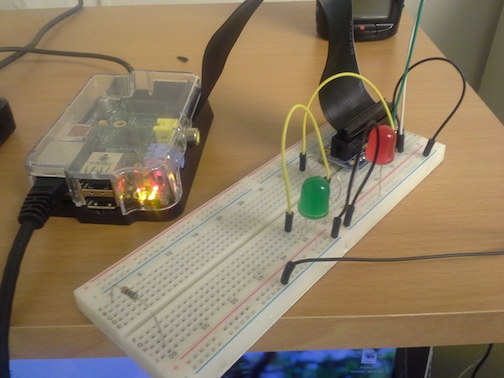
</p>

<img src="http://ccom.uprrp.edu/~humberto/images/pi-ssh-checker.jpg">
</div>
</div>
<div id="outline-container-sec-4" class="outline-2">
<h2 id="sec-4">Discussion</h2>
<div class="outline-text-2" id="text-4">
<p>
I like the program, and python generators are a lot cooler than I thought.
</p>
</div>
</div>
<div id="outline-container-sec-5" class="outline-2">
<h2 id="sec-5">References</h2>
<div class="outline-text-2" id="text-5">
<p>
<a href="https://learn.adafruit.com/raspberry-pi-e-mail-notifier-using-leds/overview">https://learn.adafruit.com/raspberry-pi-e-mail-notifier-using-leds/overview</a>
</p>

<p>
<a href="http://www.dabeaz.com/generators/Generators.pdf">http://www.dabeaz.com/generators/Generators.pdf</a>
</p>
</div>
</div>
]]></content>
  </entry>
  
  <entry>
    <title type="html"><![CDATA[Long row on paseo lineal]]></title>
    <link href="http://ccom.uprrp.edu/~humberto//blog/2014/05/17/long-row-on-paseo-lineal/"/>
    <updated>2014-05-17T10:32:13-04:00</updated>
    <id>http://ccom.uprrp.edu/~humberto//blog/2014/05/17/long-row-on-paseo-lineal</id>
    <content type="html"><![CDATA[<p>
It&#8217;s been a long time since I go out and row, but I got in a good
workout yesterday. I rowed <a href="http://www.mapmyrun.com/workout/572175259">9 miles on the paseo lineal</a>, from Santa
Rosa to the beach and back. Decent time too, 1:23.
</p>

<p>
I&#8217;m a little sore today, but it was worth it. I hope I can get a
little more exercise this summer.
</p>
]]></content>
  </entry>
  
  <entry>
    <title type="html"><![CDATA[Plotting top 10 network flows]]></title>
    <link href="http://ccom.uprrp.edu/~humberto//blog/2014/05/11/plotting-top-10-network-flows/"/>
    <updated>2014-05-11T19:16:30-04:00</updated>
    <id>http://ccom.uprrp.edu/~humberto//blog/2014/05/11/plotting-top-10-network-flows</id>
    <content type="html"><![CDATA[<p>
Using matplotlib to <a href="http://nbviewer.ipython.org/github/humberto-ortiz/top-ten/blob/master/Top%2010%20hourly.ipynb">view aggregated network flows in python</a>.</p>
]]></content>
  </entry>
  
  <entry>
    <title type="html"><![CDATA[How twitter builds distributed systems]]></title>
    <link href="http://ccom.uprrp.edu/~humberto//blog/2014/04/21/how-twitter-builds-distributed-systems/"/>
    <updated>2014-04-21T11:13:23-04:00</updated>
    <id>http://ccom.uprrp.edu/~humberto//blog/2014/04/21/how-twitter-builds-distributed-systems</id>
    <content type="html"><![CDATA[<p>
Slideshow on the use of <a href="http://monkey.org/~marius/talks/twittersystems/">scala at twitter to build distrubuted
systems</a>. They use the applicative and functional aspects to compose
applications as layers of interfaces.
</p>

<p>
Twitter is heavy into scala, they have <a href="https://twitter.github.io/scala_school/">courses</a> and <a href="https://twitter.github.io/effectivescala/">best practices</a> too.</p>
]]></content>
  </entry>
  
  <entry>
    <title type="html"><![CDATA[Sequence assembly with NetworkX]]></title>
    <link href="http://ccom.uprrp.edu/~humberto//blog/2014/01/19/sequence-assembly-with-networkx/"/>
    <updated>2014-01-19T20:50:25-04:00</updated>
    <id>http://ccom.uprrp.edu/~humberto//blog/2014/01/19/sequence-assembly-with-networkx</id>
    <content type="html"><![CDATA[<p>
I wrote an IPython notebook showing <a href="http://nbviewer.ipython.org/urls/gist.githubusercontent.com/humberto-ortiz/8512376/raw/7bd0426fbdaa4f1027e6ccb95fa8af3b6516fc51/nx-kmer-graph-10genes.ipynb">how to use NetworkX to do sequence
assembly</a>.
</p>
]]></content>
  </entry>
  
  <entry>
    <title type="html"><![CDATA[Sequence assembly: finding the best assembly]]></title>
    <link href="http://ccom.uprrp.edu/~humberto//blog/2014/01/15/sequence-assembly-finding-the-best-assembly/"/>
    <updated>2014-01-15T20:16:11-04:00</updated>
    <id>http://ccom.uprrp.edu/~humberto//blog/2014/01/15/sequence-assembly-finding-the-best-assembly</id>
    <content type="html"><![CDATA[<div id="outline-container-sec-1" class="outline-2">
<h2 id="sec-1">Introduction</h2>
<div class="outline-text-2" id="text-1">
<p>
In a <a href="http://ccom.uprrp.edu/~humberto/blog/2013/12/27/org-mode-for-reproducible-research/">recent post</a>, I showed how to build a sequence assembly using
the Eulerian path algorithm. I noted that starting the Eulerian path
algorithm on different graph vertices yielded paths of different
lengths.
</p>

<p>
I&#8217;m going to try to see why, and find the best assembly I can.
</p>
</div>
</div>

<div id="outline-container-sec-2" class="outline-2">
<h2 id="sec-2">Data structures</h2>
<div class="outline-text-2" id="text-2">
<p>
Last time, we just used a list and a dictionary to represnt the
graph. Let&#8217;s try to build a python class.
</p>

<div class="org-src-container">

<pre class="src src-python" id="k-mer-graph">from collections import deque

class KmerGraph:
    kmers = []
    neighbors = {}
    collisions = 0

    def readstograph(self, reads, k):
      for read in reads:
	  read = "".join(read)
	  for i in range(len(read) - k - 1):
	    kmer_a = read[i:i+k]
	    kmer_b = read[i+1:i+k+1]
	    if kmer_a not in self.kmers:
	      self.kmers.append(kmer_a)
	    else:
	      self.collisions += 1
	    if kmer_b not in self.kmers:
	      self.kmers.append(kmer_b)
	    else:
	      self.collisions +- 1
	    if not self.neighbors.has_key(kmer_a):
	      self.neighbors[kmer_a] = deque([kmer_b])
	    elif kmer_b not in self.neighbors[kmer_a]:
	      self.neighbors[kmer_a].append(kmer_b)
	    if kmer_b not in self.neighbors.keys():
	      self.neighbors[kmer_b] = deque([])
    def findstart(self, path):
      """Traverse the current path, looking for a node with available edges"""
      start = None
      for i in range(len(path)):
	if len(self.neighbors[self.kmers[path[i]]]) &gt; 0:
	  start = path[i]
	  break
      return start

    def extendpath(self, path):
      start = self.findstart(path)
      splicepoint = start
      if start != None:
	newpath = []
	while len(self.neighbors[self.kmers[start]]) &gt; 0:
	  next_kmer = self.neighbors[self.kmers[start]].popleft()
	  start = self.kmers.index(next_kmer)
	  newpath.append(start)
	path[splicepoint:splicepoint+1] = newpath
      return start
</pre>
</div>
</div>

<div id="outline-container-sec-2-1" class="outline-3">
<h3 id="sec-2-1">Make a random sequnce</h3>
<div class="outline-text-3" id="text-2-1">
<div class="org-src-container">

<pre class="src src-python" id="random-sequence">import random
random.seed(0)
myseq = [random.choice(['a', 'c', 'g', 't']) for i in range(1000)]
myseq[:10]
</pre>
</div>
</div>
</div>

<div id="outline-container-sec-2-2" class="outline-3">
<h3 id="sec-2-2">Simulating reads</h3>
<div class="outline-text-3" id="text-2-2">
<p>
To simulate reads, pick random starting points, and slice out fixed
length strings.
</p>
<div class="org-src-container">

<pre class="src src-python" id="make-reads">readlen = 25
starts = [random.randint(0, len(myseq)-readlen) for i in range(500)]
reads = [myseq[start:start+readlen] for start in  starts]
reads[0]
</pre>
</div>

<table border="2" cellspacing="0" cellpadding="6" rules="groups" frame="hsides">


<colgroup>
<col  class="left" />

<col  class="left" />

<col  class="left" />

<col  class="left" />

<col  class="left" />

<col  class="left" />

<col  class="left" />

<col  class="left" />

<col  class="left" />

<col  class="left" />

<col  class="left" />

<col  class="left" />

<col  class="left" />

<col  class="left" />

<col  class="left" />

<col  class="left" />

<col  class="left" />

<col  class="left" />

<col  class="left" />

<col  class="left" />

<col  class="left" />

<col  class="left" />

<col  class="left" />

<col  class="left" />

<col  class="left" />
</colgroup>
<tbody>
<tr>
<td class="left">t</td>
<td class="left">g</td>
<td class="left">c</td>
<td class="left">a</td>
<td class="left">g</td>
<td class="left">c</td>
<td class="left">t</td>
<td class="left">g</td>
<td class="left">a</td>
<td class="left">t</td>
<td class="left">a</td>
<td class="left">c</td>
<td class="left">a</td>
<td class="left">c</td>
<td class="left">g</td>
<td class="left">c</td>
<td class="left">t</td>
<td class="left">g</td>
</tr>
</tbody>
</table>
</div>
</div>
<div id="outline-container-sec-2-3" class="outline-3">
<h3 id="sec-2-3">Build a graph</h3>
<div class="outline-text-3" id="text-2-3">
<div class="org-src-container">

<pre class="src src-python" id="build-graph">kg = KmerGraph()
kg.readstograph(reads,16)
kg.collisions
len(kg.kmers)
</pre>
</div>
</div>
</div>
<div id="outline-container-sec-2-4" class="outline-3">
<h3 id="sec-2-4">Assembly</h3>
<div class="outline-text-3" id="text-2-4">
<p>
Assembly now consists of constructing an Eulerian trail in the
k-mer graph, and reading off the sequence. To find an Eulerian trail I&#8217;m
going to delete visited edges from the graph until there are no more
edges.
</p>
<div class="org-src-container">

<pre class="src src-python" id="eulerian-path">def findstart(self, path):
  """Traverse the current path, looking for a node with available edges"""
  start = None
  for i in range(len(path)):
    if len(self.neighbors[self.kmers[path[i]]]) &gt; 0:
      start = path[i]
      break
  return start

def extendpath(self, path):
  start = self.findstart(path)
  splicepoint = start
  if start != None:
    newpath = []
    while len(self.neighbors[self.kmers[start]]) &gt; 0:
      next_kmer = self.neighbors[self.kmers[start]].popleft()
      start = self.kmers.index(next_kmer)
      newpath.append(start)
    path[splicepoint:splicepoint+1] = newpath
  return start
</pre>
</div>
</div>
</div>
<div id="outline-container-sec-2-5" class="outline-3">
<h3 id="sec-2-5">Find the longest path</h3>
<div class="outline-text-3" id="text-2-5">
<div class="org-src-container">

<pre class="src src-python" id="check-start">for k in range(9,19):
  kg = KmerGraph()
  kg.readstograph(reads, k)
  nodes = len(kg.kmers)
  maxi = 0
  maxl = -1
  for i in range(nodes):
    path = [i]
    next = kg.extendpath(path)
    while (next != None):
      next = kg.extendpath(path)
    if len(path) &gt; maxl:
      maxi = i
      maxl = len(path)
    kg = KmerGraph()
    kg.readstograph(reads, k)

  print k, maxi, maxl
</pre>
</div>

<pre class="example">
9 1930 739
10 2911 738
11 3888 737
12 4860 736
13 5357 517
14 6304 516
15 7245 273
16 920 241
17 8334 207
18 9243 146
</pre>
</div>
</div>
</div>
]]></content>
  </entry>
  
  <entry>
    <title type="html"><![CDATA[Quick row on paseo lineal]]></title>
    <link href="http://ccom.uprrp.edu/~humberto//blog/2014/01/03/quick-row-on-paseo-lineal/"/>
    <updated>2014-01-03T18:22:39-04:00</updated>
    <id>http://ccom.uprrp.edu/~humberto//blog/2014/01/03/quick-row-on-paseo-lineal</id>
    <content type="html"><![CDATA[<p>
I went for a <a href="http://www.mapmyrun.com/workout/455481697">quick row</a> on the Parque paseo lineal del Rio Bayam&oacute;n. I
hit a pretty good pace, it was overcast and cool. It sprinkled a
little when I started and when I finished, but the weather
cooperated. My shoulders are sore, I hadn&#8217;t gone that fast in a long
time.
</p>
]]></content>
  </entry>
  
  <entry>
    <title type="html"><![CDATA[Org mode for reproducible research]]></title>
    <link href="http://ccom.uprrp.edu/~humberto//blog/2013/12/27/org-mode-for-reproducible-research/"/>
    <updated>2013-12-27T12:25:34-04:00</updated>
    <id>http://ccom.uprrp.edu/~humberto//blog/2013/12/27/org-mode-for-reproducible-research</id>
    <content type="html"><![CDATA[<script type="text/javascript"
  src="http://cdn.mathjax.org/mathjax/latest/MathJax.js?config=TeX-AMS-MML_HTMLorMML">
</script>
<div id="outline-container-sec-1" class="outline-2">
<h2 id="sec-1">Abstract</h2>
<div class="outline-text-2" id="text-1">
<p>
Org-mode is a text mode in the emacs editor. Recent versions of
Org-mode include support for embedding code, data, and figures in a
document. These features can be used to aid publication of
research results. This document will show some simple examples of the
available features.
</p>
</div>
</div>

<div id="outline-container-sec-2" class="outline-2">
<h2 id="sec-2">Introduction</h2>
<div class="outline-text-2" id="text-2">
<p>
Emacs <a href="http://orgmode.org">Org-mode</a> is a set of tools for managing information in plain
text files. Recent versions include <a href="http://orgmode.org/worg/org-contrib/babel/">Babel</a>, a set of features for
embedding active source code in a document. Babel draws inspiration
from literate programming tools like <a href="http://www.cs.tufts.edu/~nr/noweb/">noweb</a>, but extends beyond this by
providing support for reproducible research, like <a href="http://www.stat.uni-muenchen.de/~leisch/Sweave/">Sweave</a>.
</p>

<p>
Org-mode&#8217;s reproducible research support works with multiple
languages (even in the same document), so you can use a shell script
to generate data, analize it in R, and plot it with python. Org-mode
also supports export to many different formats, including HTML, LaTeX,
and OpenOffice, so you can publish your research in the most
convenient format.
</p>

<p>
This document will show some of the features of Org-mode by working
through a simple sequence assembly problem.
</p>
</div>
</div>

<div id="outline-container-sec-3" class="outline-2">
<h2 id="sec-3">Sequence Assembly</h2>
<div class="outline-text-2" id="text-3">
<p>
Sequence assembly is the task of reconstructing a complete sequence
from a series of fragments or &#8220;reads&#8221;. I&#8217;ll use python to develop the
example. You&#8217;ll need to set up python in Org-mode as described in the
documentation for <a href="http://orgmode.org/worg/org-contrib/babel/languages/ob-doc-python.html">ob-doc-python</a>. Let&#8217;s start by generating a
random sequence to analyze.
</p>
</div>
<div id="outline-container-sec-3-1" class="outline-3">
<h3 id="sec-3-1">Making a random sequence</h3>
<div class="outline-text-3" id="text-3-1">
<div class="org-src-container">

<pre class="src src-python" id="make-sequence">from collections import deque
import random
random.seed(0)
myseq = [random.choice(['a', 'c', 'g', 't']) for i in range(1000)]
print myseq[:10]
</pre>
</div>

<pre class="example">
['t', 't', 'c', 'c', 'g', 'c', 't', 'c', 'c', 'g']
</pre>
</div>
</div>
<div id="outline-container-sec-3-2" class="outline-3">
<h3 id="sec-3-2">Simulating reads</h3>
<div class="outline-text-3" id="text-3-2">
<p>
To simulate reads, pick random starting points, and slice out fixed
length strings.
</p>
<div class="org-src-container">

<pre class="src src-python" id="make-reads">readlen = 25
starts = [random.randint(0, len(myseq)-readlen) for i in range(500)]
reads = [myseq[start:start+readlen] for start in  starts]
print reads[0]
</pre>
</div>

<pre class="example">
&gt;&gt;&gt; &gt;&gt;&gt; ['t', 'g', 'g', 'c', 'a', 'g', 'c', 't', 'g', 'a', 't', 'a', 'a', 'c', 'a', 'a', 'c', 'g', 'c', 'c', 'c', 'c', 'c', 't', 'g']
</pre>
</div>
</div>
<div id="outline-container-sec-3-3" class="outline-3">
<h3 id="sec-3-3">Checking coverage</h3>
<div class="outline-text-3" id="text-3-3">
<p>
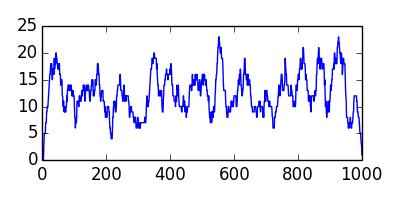
OK, so let&#8217;s have a look at our coverage.
</p>
<div class="org-src-container">

<pre class="src src-python">results = "coverage.png"
coverage = [0] * len(myseq)
for start in starts:
  for i in range(start, start+readlen):
    coverage[i] += 1

import matplotlib, numpy
matplotlib.use('Agg')
import matplotlib.pyplot as plt
fig=plt.figure(figsize=(4,2))
plt.plot(coverage)
fig.tight_layout()
plt.savefig(results)
results
</pre>
</div>
<img class="left" src="http://ccom.uprrp.edu/~humberto//images/coverage.png">
</div>
</div>
<div id="outline-container-sec-3-4" class="outline-3">
<h3 id="sec-3-4">Building a de Bruijn graph</h3>
<div class="outline-text-3" id="text-3-4">
<p>
If we traverse each read, we can construct a de Bruijn graph, vertices are
fixed sized words of length \(k\), and two kmers \(a\) and \(b\) are connected by an edge
if there is a read that contains \(a\) at position \(i\) and \(b\) at position
\(i+1\).
</p>
<div class="org-src-container">

<pre class="src src-python" id="make-graph">k = 16
kmers = []
kmergraph = {}

for read in reads:
  read = "".join(read)
  for i in range(len(read) - k - 1):
    kmer_a = read[i:i+k]
    kmer_b = read[i+1:i+k+1]
    if kmer_a not in kmers:
       kmers.append(kmer_a)
    if kmer_b not in kmers:
       kmers.append(kmer_b)
    if kmer_a not in kmergraph.keys():
       kmergraph[kmer_a] = deque([kmer_b])
    elif kmer_b not in kmergraph[kmer_a]:
       kmergraph[kmer_a].append(kmer_b)
    if kmer_b not in kmergraph.keys():
       kmergraph[kmer_b] = deque([])

#print kmers[:10]
</pre>
</div>
</div>
</div>
<div id="outline-container-sec-3-5" class="outline-3">
<h3 id="sec-3-5">Assembly</h3>
<div class="outline-text-3" id="text-3-5">
<p>
Assembly now consists of constructing an Eulerian trail in the
kmergraph, and reading off the sequence. To find an Eulerian trail I&#8217;m
going to delete visited edges from the graph until there are no more
edges.
</p>
<div class="org-src-container">

<pre class="src src-python">def findstart(kmers, kmergraph, path):
  start = None
  for i in range(len(path)):
    if len(kmergraph[kmers[path[i]]]) &gt; 0:
      start = path[i]
      break
  return start

def extendpath(kmers, kmergraph, path):
  start = findstart(kmers, kmergraph, path)
  splicepoint = start
  if start != None:
    newpath = []
    while len(kmergraph[kmers[start]]) &gt; 0:
      next_kmer = kmergraph[kmers[start]].popleft()
      start = kmers.index(next_kmer)
      newpath.append(start)
    path[splicepoint:splicepoint+1] = newpath
  return start
</pre>
</div>

<p>
If we start at vertex 0, we can extend the path until we can find no
vertices that still have edges. We could start anywhere, and different
start points may find different contigs. I checked the first couple hundred
vertices, and starting at position 330 produced the longest assembly.
</p>

<div class="org-src-container">

<pre class="src src-python">for i in range(330,331):
  start = i
  print start, 
  path = [start]
  next = extendpath(kmers, kmergraph, path)
  while (next != None):
    next = extendpath(kmers, kmergraph, path)
  print len(path)
  k = 16
  kmers = []
  kmergraph = {}

  for read in reads:
    read = "".join(read)
    for i in range(len(read) - k - 1):
      kmer_a = read[i:i+k]
      kmer_b = read[i+1:i+k+1]
      if kmer_a not in kmers:
	 kmers.append(kmer_a)
      if kmer_b not in kmers:
	 kmers.append(kmer_b)
      if kmer_a not in kmergraph.keys():
	 kmergraph[kmer_a] = deque([kmer_b])
      elif kmer_b not in kmergraph[kmer_a]:
	 kmergraph[kmer_a].append(kmer_b)
      if kmer_b not in kmergraph.keys():
	 kmergraph[kmer_b] = deque([])

  #print kmers[:10]
</pre>
</div>

<p>
We can follow the trail, pulling the last character from each vertex
to reconstruct the sequence.
</p>

<div class="org-src-container">

<pre class="src src-python">assembly = kmers[path[0]]
for i in range(1, len(path)):
  assembly += kmers[path[i]][-1]

len(assembly)
</pre>
</div>

<pre class="example">
253
</pre>

<p>
We successfully recovered 253 bases in the 1000 base sequence.
</p>
<div class="org-src-container">

<pre class="src src-python">def wrap(seq):
  start = 0
  for i in range(60, len(seq), 60):
    print seq[start: i]
    start = i
  print seq[start:]
</pre>
</div>

<div class="org-src-container">

<pre class="src src-python" id="results">print "&gt;myseq"
wrap("".join(myseq))
print
print "&gt;assembly"
wrap(assembly)
print
</pre>
</div>

<pre class="example">
&gt;myseq
ttccgctccgtgctgcttttcgtgcacgttctctgagctgactactagattcacgtaggg
tgtggcgcgcaaggcattttttgcgctttgtgcgtttagcgtagaatctaagagtggagg
gcctaataaattacacagcagaatacgttagtagtccgcaccggcctcgagcacatccct
gggccgaacagctgccgcgaccagcgttccctttatgagtcgcagatgaagtctatcacc
ttaggctcaaggtttaggggtgcgagaactgcgaatccgccaaagacccatcttccgccg
ttgctgaagaacgccggcctctccatgtcgacaataaacgattacgtctcccgagacttt
aacttggtaataaaatcaagtgtgggtttgtaggtctcgttgaagcattcctagactaac
ctggatcgcacaaggagcctctgcgcaggtattttgtgtatctctaatcttggaatttgc
cacgttcatgacgattgaacacattataagtaacagtaactatcccttgatagatttcat
ccaaaaacggacgacctaccgcaccttcggtcctcactacgcaaggactggagcgtatct
atacggcaccttgatccgataccggggcgcttccgagcgagccccgcgacgagactagat
gggaagttggatcaccactccggatctctcaatgacaaaagaggggctccggttttgcga
caaagatgtctccattcccaacagaaggctccgatacgattcaaatctcacttaacattc
cgcgaccggcaatagacggggtagagcgggataggagcatgcgaactgatttggagttcg
gtatgccaaggctcctcggttcaagtccggcgccggaagaaagaatctaccactgcccgg
gcatccaatggacttaatatgaatggcagctgataacaacgccccctgttgcgcgccaga
ggtcgagcttagcttgggcttcgatgtcgctgtaaaattc

&gt;assembly
tttgcgacaaagatgtctccattcccaacagaaggctccgatacgattcaaatctcactt
aacattccgcgaccggcaatagacggggtagagcgggataggagcatgcgaactgatttg
gagttcggtatgccaaggctcctcggttcaagtccggcgccggaagaaagaatctaccac
tgcccgggcatccaatggacttaatatgaatggcagctgataacaacgccccctgttgcg
cgccagaggtcga
</pre>
</div>
</div>
</div>
]]></content>
  </entry>
  
  <entry>
    <title type="html"><![CDATA[Seattle distributed computing]]></title>
    <link href="http://ccom.uprrp.edu/~humberto//blog/2013/12/26/seattle-distributed-computing/"/>
    <updated>2013-12-26T12:01:52-04:00</updated>
    <id>http://ccom.uprrp.edu/~humberto//blog/2013/12/26/seattle-distributed-computing</id>
    <content type="html"><![CDATA[<div id="outline-container-sec-1" class="outline-2">
<h2 id="sec-1">Abstract</h2>
<div class="outline-text-2" id="text-1">
<p>
The Seattle distributed system is a framework for running python
programs across many computers on the Internet.
</p>
</div>
</div>

<div id="outline-container-sec-2" class="outline-2">
<h2 id="sec-2">Introduction</h2>
<div class="outline-text-2" id="text-2">
<p>
I&#8217;ve been interested in <a href="http://www.hpcf.upr.edu/~humberto/documents/penguin-safe-scripting.html">distributed scripting</a> since I was a graduate
student in <a href="http://www.utsa.edu/">The University of Texas at San Antonio</a>. I was pleasantly
surprised to see that there is a new python implementation of
distributed scripting.
</p>

<p>
<a href="https://seattle.poly.edu/">Seattle</a> is geared towards creation of distributed network programs,
but uses a restricted python interpreter, you can write arbitrary
programs as well.
</p>
</div>
</div>

<div id="outline-container-sec-3" class="outline-2">
<h2 id="sec-3">Implementation</h2>
<div class="outline-text-2" id="text-3">
<p>
I haven&#8217;t seen the source of entire system, but there are three main
components. Users run a <a href="https://seattleclearinghouse.poly.edu/download/flibble/">seattle server</a> and donate compute resources to
the Seattle community. The <a href="https://seattleclearinghouse.poly.edu/">Seattle clearinghouse</a> arbitrates access to
the donated resources, and manages reservations on one or more nodes
(called &#8220;vessels&#8221; in Seattle). The devkit (available for download on
your clearinghouse profile page) provides tools to develop
Seattle programs and run on the vessels reserved for you.
</p>

<p>
Users are identified by public/private keypairs, and have access to a
restricted subset of python called <a href="https://seattle.poly.edu/wiki/PythonVsRepy">Repy</a>. Several example programs are
included in the devkit, and <a href="https://seattle.poly.edu/wiki/EducatorsPage#SecurityOperatingSystemsAssignments">more</a> are available on the Seattle website.
</p>

<p>
Repy limits the features available to programmers, but you can develop
a program in another language and call repy to perform distributed
computing, or use Repy or <a href="https://seattle.poly.edu/wiki/SeattleLib">SeattleLib</a> features to implement your
program. Developer specific information is available <a href="https://seattle.poly.edu/wiki/ProgrammersPage">online</a>.
</p>
</div>
</div>
]]></content>
  </entry>
  
</feed>
